What Is SEO? A Complete Beginner’s Guide (2026)
Table of Contents
- What Is SEO?
- Why SEO Matters
- How Search Engines Work
- Types of SEO
- Keyword Research
- On-Page SEO
- Technical SEO
- Link Building
- Local SEO
- Common SEO Mistakes
- Best SEO Tools
- SEO Trends in 2026
- Frequently Asked Questions
- Conclusion
What Is SEO?
Now you understand what SEO is and why it matters.

Search Engine Optimization (SEO) is the process of improving a website so that it ranks higher in search engine results such as Google, Bing, and other search engines. The primary goal of SEO is to increase organic traffic—visitors who find your website naturally without clicking on paid advertisements.
Every day, billions of searches are performed on Google. People search for products, services, tutorials, reviews, and answers to their questions. When your website appears on the first page of search results, you have a much better chance of attracting visitors who are genuinely interested in your content.
SEO combines technical improvements, content creation, keyword research, user experience, and authority building to help search engines understand your website and recommend it to users.
Unlike paid advertising, SEO can continue bringing traffic long after an article has been published. This makes it one of the most cost-effective digital marketing strategies available today.
Why SEO Is Important
SEO is essential because it helps businesses, bloggers, and website owners connect with their target audience at the exact moment people are searching for relevant information.
Here are some of the biggest benefits of SEO:
1. Increase Organic Traffic
Ranking on Google’s first page means more people discover your website without paying for every click.
2. Build Trust and Authority
Users naturally trust websites that appear at the top of search results. High rankings improve credibility.
3. Improve User Experience
Modern SEO focuses on creating fast, mobile-friendly, and easy-to-use websites.
4. Better Conversion Rates
Organic visitors usually have higher purchase intent because they are actively searching for solutions.
5. Long-Term Results
Unlike paid ads that stop generating traffic once the budget ends, SEO can continue producing results for months or even years.
How Search Engines Work
Understanding how search engines work is the foundation of SEO.
Google follows three main steps:
Crawling
Google uses automated bots called crawlers or spiders to discover new pages across the internet.
Indexing
After discovering a page, Google analyzes the content and stores it inside its massive database called the index.
Ranking
When someone searches for information, Google’s algorithm evaluates hundreds of ranking factors to determine which pages provide the best answer.
Some important ranking factors include:
- Content quality
- Keyword relevance
- Website speed
- Mobile friendliness
- Backlinks
- User experience
- Page authority
- Helpful content
- Internal linking
The better your website performs in these areas, the higher your chances of ranking.
Types of SEO
SEO consists of several different areas.
On-Page SEO
On-page SEO focuses on optimizing elements directly on your website.
Examples include:
- Optimized titles
- Meta descriptions
- Header tags
- Internal links
- Image optimization
- Content quality
- URL structure
Off-Page SEO
Off-page SEO focuses on improving your website’s authority through external signals.
Examples include:
- Backlinks
- Brand mentions
- Guest posting
- Digital PR
- Social sharing
Technical SEO
Technical SEO ensures search engines can easily crawl and understand your website.
It includes:
- XML Sitemaps
- Robots.txt
- HTTPS
- Canonical URLs
- Structured Data
- Core Web Vitals
- Mobile Optimization
Local SEO
Local SEO helps businesses appear in local search results.
Important elements include:
- Google Business Profile
- Customer Reviews
- Local Citations
- Local Keywords
- Maps Optimization
Image SEO
Optimizing images helps improve visibility in Google Images.
Best practices include:
- Descriptive filenames
- ALT text
- Compressed images
- Modern formats like WebP
- Lazy loading
Why SEO Matters
Understanding What Is SEO helps businesses attract more organic traffic.
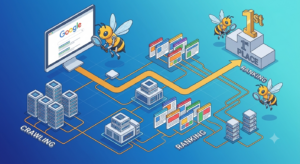 SEO is one of the most cost-effective digital marketing strategies available today. Unlike paid advertising, organic search traffic continues to generate visitors long after content is published. A well-optimized website can attract thousands of visitors every month without paying for every click.
Here are the main benefits of SEO:
- Increases organic website traffic
- Builds trust and credibility
- Improves brand awareness
- Generates qualified leads
- Increases sales and conversions
- Delivers long-term results
- Provides a higher return on investment than many paid marketing channels
Businesses of every size—from small local companies to global brands—invest in SEO because search engines remain one of the largest sources of online traffic.
How Search Engines Work
To understand What Is SEO, you first need to know how search engines work.
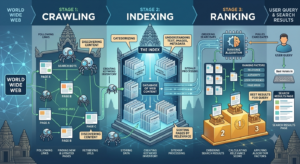
Search engines such as Google use automated programs called crawlers (or spiders) to discover websites across the internet.
The SEO process generally involves three stages:
1. Crawling
Googlebot visits websites by following links and discovering new pages. If your page has no internal or external links, Google may take longer to find it.
2. Indexing
After crawling a page, Google analyzes the content and stores it in its massive index if it meets quality standards.
Pages that are blocked by robots.txt or marked with noindex will not appear in Google Search.
3. Ranking
When someone searches for information, Google’s algorithms evaluate thousands of ranking signals to determine which pages provide the best answer.
Ranking factors include:
- Content quality
- Relevance
- Page speed
- Mobile friendliness
- Backlinks
- User experience
- Search intent
- Website authority
Types of SEO
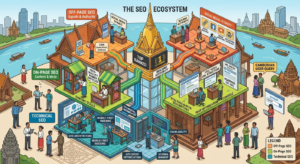
SEO is divided into several important categories.
1. On-Page SEO
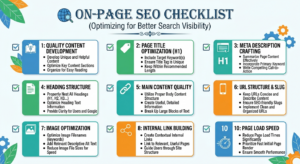
On-Page SEO is one of the most important parts of What Is SEO.
Examples include:
- Optimizing title tags
- Writing compelling meta descriptions
- Using H1, H2, and H3 headings
- Internal linking
- Image optimization
- URL optimization
- Keyword placement
2. Off-Page SEO
Off-page SEO focuses on activities outside your website that improve authority and trust.
Examples include:
- Link building
- Brand mentions
- Guest posting
- Digital PR
- Social media promotion
High-quality backlinks remain one of Google’s strongest ranking signals.
3. Technical SEO
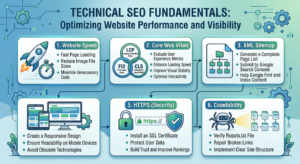
Technical SEO ensures that What Is SEO strategies work effectively.
Important technical SEO tasks include:
- XML sitemap
- Robots.txt optimization
- HTTPS security
- Mobile optimization
- Page speed improvements
- Structured data (Schema)
- Canonical URLs
- Fixing crawl errors
4. Local SEO
Local SEO helps businesses appear in local search results.
Important elements include:
- Google Business Profile
- Customer reviews
- Local citations
- Local keywords
- Maps optimization
5. Image SEO
Optimizing images helps improve visibility in Google Images.
Best practices include:
- Descriptive filenames
- ALT text
- Compressed images
- Modern formats like WebP
- Lazy loading
Keyword Research
Keyword research is an essential part of What Is SEO.

Keyword research is the foundation of every successful SEO strategy. It involves finding the words and phrases that people type into search engines when looking for information, products, or services.
Targeting the right keywords helps you create content that matches user intent and attracts qualified visitors to your website.
For example, instead of targeting a broad keyword like SEO, you could target more specific keywords such as:
- SEO for beginners
- What is SEO
- SEO tips for small businesses
- Learn SEO in 2026
- On-page SEO checklist
Long-tail keywords usually have lower competition and higher conversion rates because they target users with a specific search intent.
How to Find Keywords
There are many tools available for keyword research. Some of the most popular include:
- Google Keyword Planner
- Google Search Console
- Google Trends
- Ahrefs
- Semrush
- Ubersuggest
- AnswerThePublic
When researching keywords, consider these important metrics:
- Search volume
- Keyword difficulty
- Search intent
- Cost per click (CPC)
- Competition level
The goal is to find keywords with a good balance between search volume and ranking difficulty.
Understanding Search Intent
Search intent refers to the reason behind a user’s search query. Google prioritizes pages that best satisfy the user’s intent.
There are four primary types of search intent.
1. Informational Intent
Users want to learn something.
Examples:
- What is SEO?
- How does Google work?
- SEO tutorial
Content type:
- Guides
- Tutorials
- Blog posts
2. Navigational Intent
Users are looking for a specific website or brand.
Examples:
- Google Search Console
- WordPress
- Rank Math SEO
Content type:
- Homepage
- Brand pages
3. Commercial Investigation
Users are comparing products or services before making a purchase.
Examples:
- Best SEO tools
- Ahrefs vs Semrush
- Best keyword research software
Content type:
- Comparison articles
- Reviews
- Buying guides
4. Transactional Intent
Users are ready to take action.
Examples:
- Buy SEO course
- Hire SEO expert
- Purchase backlinks
Content type:
- Landing pages
- Product pages
- Service pages
Matching your content to the correct search intent significantly increases your chances of ranking higher on Google.
On-Page SEO Best Practices
On-page SEO involves optimizing individual pages to improve their visibility in search engines and provide a better user experience.
Write an SEO-Friendly Title
Your title tag is one of the most important ranking factors.
A good title should:
- Include your primary keyword
- Stay under 60 characters
- Be clear and engaging
- Encourage users to click
Example:
What Is SEO? A Complete Beginner’s Guide (2026)
Create a Compelling Meta Description
Although the meta description is not a direct ranking factor, it can improve your click-through rate (CTR).
A good meta description should:
- Be between 150–160 characters
- Include your main keyword
- Explain the page clearly
- Encourage users to visit your website
Example:
Learn what SEO is, how search engines work, and the best beginner-friendly SEO strategies to improve your Google rankings in 2026.
Use Proper Heading Structure
Organize your content using headings.
Recommended structure:
- H1 for the page title
- H2 for main sections
- H3 for subsections
- H4 only when necessary
A clear heading structure helps both readers and search engines understand your content.
Optimize Your URLs
Keep URLs short, descriptive, and keyword-focused.
Good example:
https://example.com/what-is-seoAvoid URLs like:
https://example.com/post?id=12345Internal Linking
Internal links connect pages within your own website.
Benefits include:
- Helping Google discover new pages
- Passing SEO authority between pages
- Increasing page views
- Improving user navigation
Whenever possible, link to related articles naturally within your content.
External Linking
Linking to trustworthy sources can improve credibility.
Examples include:
- Google’s official documentation
- Bing Webmaster Guidelines
- Industry-leading SEO blogs
Only link to authoritative and relevant websites.
Optimize Images
Images improve user engagement but should also be optimized for SEO.
Best practices:
- Use descriptive filenames
- Add meaningful ALT text
- Compress large images
- Use WebP format when possible
- Enable lazy loading
Optimized images help improve page speed and increase visibility in Google Images.
Improve Readability
Content that is easy to read usually performs better.
Tips:
- Write short paragraphs
- Use bullet points
- Add numbered lists
- Include visuals where appropriate
- Break long sections into smaller headings
A better reading experience keeps visitors on your website longer and reduces bounce rates.
Technical SEO
Technical SEO focuses on improving the technical aspects of your website so search engines can crawl, index, and rank your content more efficiently. Even the best content may struggle to rank if your website has technical issues.
Improve Website Speed
Page speed is an important ranking factor and directly affects user experience. Visitors expect a website to load quickly, and slow-loading pages often result in higher bounce rates.
Here are some ways to improve website speed:
- Compress images before uploading them.
- Use modern image formats such as WebP.
- Enable browser caching.
- Minify CSS, JavaScript, and HTML files.
- Use a reliable hosting provider.
- Enable a Content Delivery Network (CDN).
Google’s Core Web Vitals also measure how users experience your website, making speed optimization more important than ever.
Make Your Website Mobile-Friendly
More than half of all web traffic now comes from mobile devices. Google uses mobile-first indexing, meaning it primarily evaluates the mobile version of your website.
Ensure that:
- Your design is responsive.
- Text is easy to read.
- Buttons are easy to tap.
- Images scale correctly.
- Navigation works smoothly on smartphones and tablets.
Use HTTPS
Website security is essential.
Install an SSL certificate so your website uses HTTPS instead of HTTP.
Benefits include:
- Better security
- Increased visitor trust
- Improved SEO
- Protection of user data
Modern browsers may warn visitors when a website does not use HTTPS.
Submit an XML Sitemap
An XML sitemap helps search engines discover your pages faster.
Rank Math automatically generates an XML sitemap.
Your sitemap usually looks like:
https://yourdomain.com/sitemap_index.xmlSubmit your sitemap to Google Search Console after launching your website.
Optimize Robots.txt
The robots.txt file tells search engines which pages should or should not be crawled.
Avoid blocking important pages unless necessary.
Example:
User-agent: *
Allow: /

Sitemap: https://yourdomain.com/sitemap_index.xml
Fix Broken Links
Broken links create a poor user experience and waste crawl budget.
Regularly check your website for:
- 404 errors
- Broken internal links
- Broken external links
- Redirect loops
Fixing these issues helps both users and search engines.
Link Building
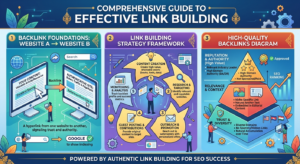
Backlinks remain one of Google’s strongest ranking factors.
A backlink is a link from another website pointing to your content.
High-quality backlinks tell Google that your content is trustworthy and valuable.
Why Backlinks Matter
Good backlinks can:
- Improve rankings
- Increase website authority
- Drive referral traffic
- Build trust
- Help pages get indexed faster
However, quality is far more important than quantity.
White Hat Link Building Strategies
The safest link-building methods include:
Create High-Quality Content
People naturally link to helpful guides, research, statistics, and tutorials.
Guest Posting
Write valuable articles for reputable websites in your industry.
In return, you may receive a backlink to your website.
Resource Pages
Many websites maintain lists of useful resources.
Reach out and suggest your content if it adds value.
Broken Link Building
Find broken links on other websites and recommend your relevant article as a replacement.
This strategy benefits both website owners and your SEO.
Digital PR
Publish original research, surveys, case studies, or unique insights that journalists and bloggers want to reference.
Avoid Black Hat SEO
Never use manipulative link-building techniques such as:
- Buying backlinks
- Link farms
- Private Blog Networks (PBNs)
- Automated link software
- Spam comments
- Hidden links
These methods can result in Google penalties and long-term ranking losses.
Local SEO
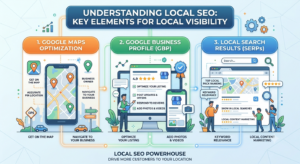
If your business serves customers in a specific city or region, Local SEO is essential.
It helps your business appear in:
- Google Search
- Google Maps
- Local Pack results
Optimize Your Google Business Profile
A complete Google Business Profile increases your visibility in local searches.
Include:
- Business name
- Address
- Phone number
- Business hours
- Website
- Photos
- Services
- Customer reviews
Keep your information accurate and up to date.
Encourage Customer Reviews
Positive reviews build trust and improve local rankings.
Ask satisfied customers to leave honest reviews.
Always respond professionally to both positive and negative feedback.
Use Local Keywords
Include location-based keywords naturally in your content.
Examples:
- SEO agency in New York
- Best coffee shop in Chicago
- Digital marketing services in London
Avoid keyword stuffing.
Build Local Citations
A citation is any online mention of your business information.
Ensure your Name, Address, and Phone Number (NAP) remain consistent across:
- Business directories
- Social media profiles
- Local listings
- Industry-specific directories
Consistency improves local SEO performance.
Common SEO Mistakes
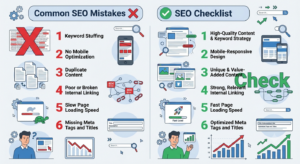
Many beginners unknowingly make mistakes that hurt their rankings.
Avoid these common problems:
- Keyword stuffing
- Publishing thin or low-quality content
- Ignoring search intent
- Using duplicate content
- Missing title tags and meta descriptions
- Slow website speed
- Poor mobile experience
- Broken internal links
- Forgetting image ALT text
- Not updating old content
- Buying backlinks
- Ignoring Google Search Console data
SEO is a long-term strategy. Focus on providing value rather than trying to manipulate search engine algorithms.
Best SEO Tools
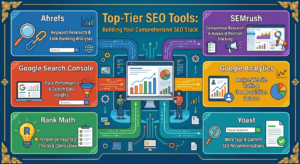
Using the right SEO tools can save time, uncover valuable insights, and improve your website’s performance. Whether you’re a beginner or an experienced marketer, these tools can help you optimize your content more effectively.
Free SEO Tools
Google Search Console
Google Search Console is one of the most important free SEO tools. It helps you:
- Monitor website performance
- Submit XML sitemaps
- Identify indexing issues
- View search queries
- Track impressions and clicks
- Fix crawl errors
Every website owner should set up Google Search Console as soon as possible.
Google Analytics 4 (GA4)
Google Analytics provides detailed information about your visitors.
You can track:
- Website traffic
- User behavior
- Top-performing pages
- Traffic sources
- Conversion rates
- Audience demographics
Understanding your visitors helps you make smarter SEO decisions.
Google Trends
Google Trends shows how search interest changes over time.
Use it to:
- Discover trending topics
- Compare keywords
- Identify seasonal trends
- Find popular search terms
Google Keyword Planner
Although designed for advertisers, Keyword Planner is also useful for SEO keyword research.
It provides:
- Keyword ideas
- Monthly search volume
- Competition estimates
Paid SEO Tools
If you’re ready to invest in professional SEO, consider these popular platforms:
- Ahrefs
- Semrush
- Moz Pro
- SE Ranking
- Mangools
- Serpstat
These tools offer advanced features such as:
- Competitor analysis
- Backlink research
- Keyword tracking
- Site audits
- Content optimization
- Rank monitoring
SEO Trends in 2026
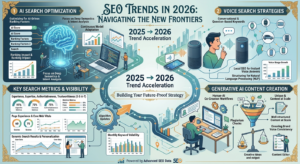
SEO continues to evolve as search engines become more sophisticated. Staying up to date with the latest trends will help you remain competitive.
AI-Powered Search
Artificial Intelligence is transforming search engines.
Google uses AI to better understand:
- Search intent
- User behavior
- Content quality
- Natural language
This means helpful, accurate, and original content is more important than ever.
Helpful Content
Google rewards websites that create content for people—not just search engines.
Helpful content should be:
- Original
- Accurate
- Easy to understand
- Well-structured
- Written by knowledgeable authors
Avoid publishing low-quality or AI-generated content without careful editing and fact-checking.
User Experience (UX)
A great user experience improves both SEO and conversions.
Focus on:
- Fast loading pages
- Mobile-friendly design
- Clear navigation
- Readable typography
- Easy-to-find information
Happy visitors are more likely to stay longer and engage with your content.
Core Web Vitals
Google continues to prioritize websites that provide a smooth browsing experience.
Pay attention to:
- Largest Contentful Paint (LCP)
- Interaction to Next Paint (INP)
- Cumulative Layout Shift (CLS)
Improving these metrics can positively impact your rankings.
E-E-A-T
Google values content that demonstrates:
- Experience
- Expertise
- Authoritativeness
- Trustworthiness
To improve E-E-A-T:
- Publish accurate information.
- Cite reliable sources.
- Keep content updated.
- Showcase author expertise.
- Build a trustworthy brand.
Frequently Asked Questions (FAQ)
How long does SEO take?
SEO is a long-term strategy. Most websites begin seeing noticeable improvements within 3 to 6 months, while highly competitive industries may take longer.
Is SEO free?
You don’t pay Google to rank organically. However, SEO often requires time, effort, and sometimes investments in tools, content creation, or professional services.
Is SEO better than Google Ads?
SEO and Google Ads serve different purposes. SEO builds long-term organic traffic, while Google Ads delivers immediate visibility. Many successful businesses use both strategies together.
Can I learn SEO by myself?
Absolutely. There are many free resources, tutorials, and tools available online. With consistent practice, beginners can build strong SEO skills over time.
How often should I update my content?
Review important articles every 6 to 12 months. Update outdated information, improve readability, add new insights, and optimize for the latest search trends.
What is the most important SEO ranking factor?
There is no single ranking factor. Google considers hundreds of signals, but high-quality content, relevant keywords, user experience, backlinks, and technical optimization all play significant roles.
Final SEO Checklist
Before publishing any article, make sure you have completed the following:
- ✔️ Include your primary keyword in the title.
- ✔️ Write a compelling meta description.
- ✔️ Use clear H2 and H3 headings.
- ✔️ Optimize images with ALT text.
- ✔️ Add internal links to related articles.
- ✔️ Include external links to authoritative sources.
- ✔️ Keep URLs short and descriptive.
- ✔️ Ensure the page loads quickly.
- ✔️ Check mobile responsiveness.
- ✔️ Proofread for grammar and spelling.
- ✔️ Update the content regularly.
Conclusion
Now you have a complete understanding of What Is SEO, how search engines work, and the best SEO practices for beginners. By applying these techniques consistently, you can improve your website’s visibility and attract more organic traffic in 2026 and beyond.
Success in SEO doesn’t happen overnight. It requires patience, consistency, and a commitment to creating high-quality content that genuinely helps users. Focus on understanding your audience, answering their questions, and delivering the best possible experience.
Whether you’re running a personal blog, an eCommerce store, or a business website, investing in SEO today can provide lasting benefits for years to come. Keep learning, stay updated with industry trends, and continuously improve your website. Over time, these efforts can lead to higher rankings, increased traffic, and greater online success.
Useful Resources
Google Search Central
Google Search Console
Google SEO Starter Guide